MBOX is a plain text file format that stores many emails in one file and a From line separates every email. Four variants called mboxo, mboxrd, mboxcl and mboxcl2 follow separate rules for body lines that begin with From. Three ways open MBOX files and they are a text editor, an email client like Thunderbird or Apple Mail and MBOX viewer software. Outlook cannot open MBOX files so convert them to PST first. Open one MBOX file in a second client before you decide it is damaged.
Thunderbird, Apple Mail and Google Takeout give you MBOX files when you export or back up your messages. MBOX file format stores an entire mailbox in a single plain text file in its raw form with the header followed by the body.
Raw storage makes the emails hard to open. I created this guide to explain what an MBOX file is, how it stores your emails, its variants and the ways to open it on Windows and Mac. Stay tuned for common problems and fixes at the end.
MBOX File Meaning and Features Explained
MBOX stands for mailbox and stores many emails in a single plain text file. New emails go to the end of the file so older emails sit near the top. Every email has its own headers, body text and attachments.
- Plain Text. Open the file in any text editor and you see headers and body lines.
- One File. A full mail folder sits in a single file instead of thousands of small ones.
- Any Extension. Many files end in .mbox but the format does not require it. Thunderbird uses no extension.
Related variants make up the format instead of one strict standard. RFC 4155 came out in September 2005 and describes the default format and the application/mbox media type. Informational in status, RFC 4155 does not make MBOX an Internet standard.
Uses of MBOX Files
- Mailbox Backups. Save a full copy of your mail outside your email account.
- Client Moves. Move folders from one email client into another.
- Archives. Google Takeout delivers Gmail data as MBOX when you download it.
Legal and audit teams also use MBOX because plain text emails open in ordinary search tools. Teams then save emails as PDF for case files and the MBOX to PDF steps with attachments show how.
How to Open an MBOX File?
You can open MBOX in three ways. Use a text editor to look at the raw data, an email client to import the emails or viewer software that needs no email client.
View MBOX Files With Notepad or TextEdit
Choose Notepad or TextEdit from the context menu of the file. You see headers and encoded attachments but no formatted emails.
Do not edit or save the file. One small edit can break a separator line and split an email.
Import MBOX Files in Thunderbird or Apple Mail
Thunderbird needs the free ImportExportTools NG extension to import MBOX files and How to Import Emails in Thunderbird explains the steps. Apple Mail imports them through File > Import Mailboxes and the Files in mbox format option while the Apple Mail MBOX import and export steps explain more.
Both clients copy the emails into their own mail store so your original file remains unchanged.
Open MBOX Files Without an Email Client
EmailDoctor MBOX Viewer Pro opens MBOX, MBS and MBX files on Windows without an email client or an import. Eight views including Normal Mail, Hex, MIME and Attachments show every email.
Follow these steps to open your file on Windows.
- Launch the viewer after the install. Its home screen lists the steps in order.

- Click Add File in the top bar.

- Choose File mode for one file or Folder mode for many. Click the ... button near Select Path and choose your MBOX file.

- Click Add. Your file name appears in the left pane.

- Let the scan finish and click Yes when the viewer asks to save the scan file.

- Select a folder in the left pane and click an email. Normal Mail View shows the headers and body.

- Use the search option with AND, OR or NONE to find emails by sender, subject or date.

Mac users add files in EmailDoctor MBOX Converter and export them to other formats. Output formats include EML, MSG, EMLX, HTML, PST, TXT, CSV, MHT and PDF.
How Does an MBOX File Store Emails?
Any text editor shows the structure quickly. Sample data given below shows how two emails sit in one file (check From lines carefully).
From sender@example.com Mon Oct 12 10:15:30 2026
From: Sender <sender@example.com>
To: you@example.com
Subject: Project update
Date: Mon, 12 Oct 2026 10:15:30 +0000

Hi team, the report is ready.

From jane@example.com Tue Oct 13 09:02:11 2026
From: Jane <jane@example.com>
To: you@example.com
Subject: Meeting notes
Date: Tue, 13 Oct 2026 09:02:11 +0000

Notes are attached.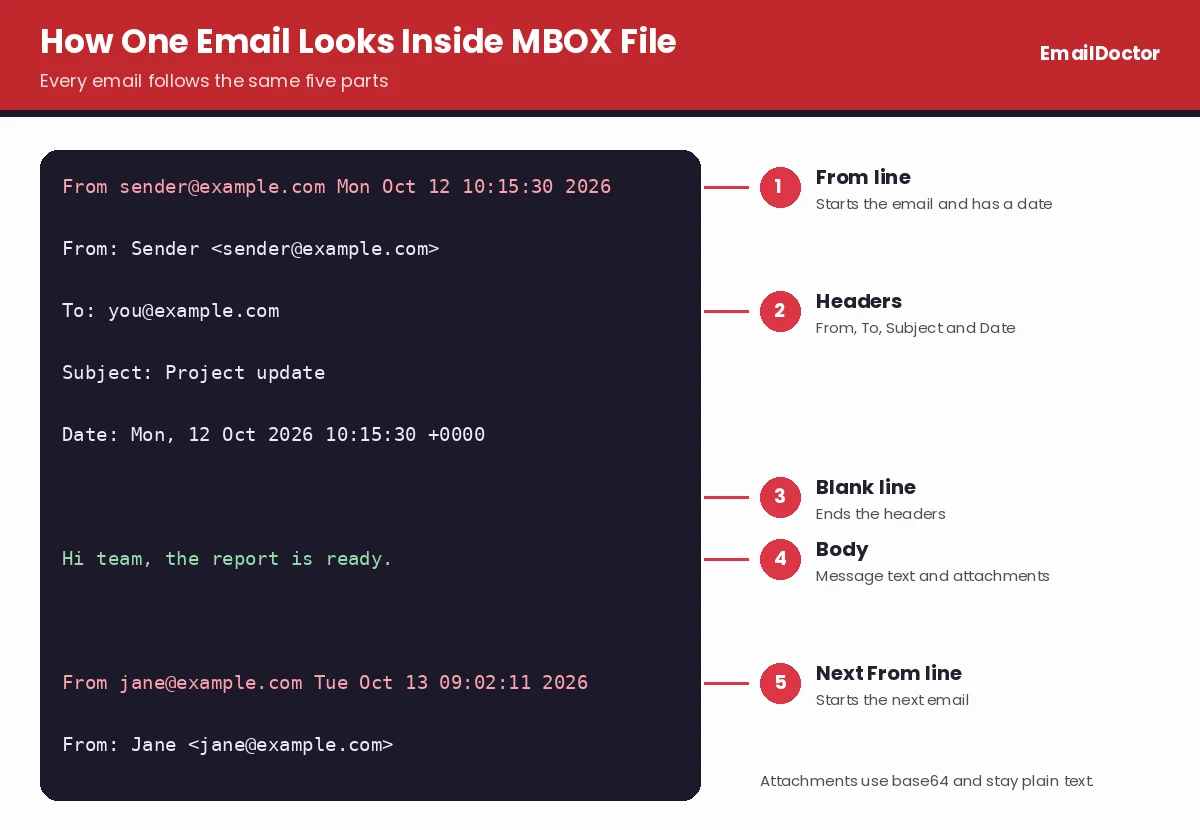
- From Line Starts Every Email. Every email begins with a line made of the word From, a space, a sender address and a date. That separator differs from the From header inside an email. Email clients find the start of an email through the From word. Dates follow the ctime style and have no time zone. MBOX has no magic number so a file begins with the word From and a space.
- Headers and Body Follow the Separator. Headers like From, To, Subject and Date come right after the From line. Then a blank line ends the headers and the message body starts. Another blank line ends the email.
- Attachments Sit Inside the Same File. Every email stores attachments as MIME parts. Base64 encoding converts attachments like PDFs and images into plain text so the entire MBOX file remains plain text. Base64 makes the data about one third larger and that is why MBOX files grow quickly.
MBOX has no index and no encryption. Email clients scan the file from the top to find emails so large files open slowly.
Why MBOX Variants Treat “From” Lines Differently
Trouble starts when a line inside an email body begins with the word From and a space. Email clients cannot tell that line from a real separator so one email can split into two.
Variants solve this problem in different ways. Names like mboxo, mboxrd, mboxcl and mboxcl2 date back to 1996 and every one came from a different Unix version.
| Variant | From Line in the Body | Content-Length Header |
|---|---|---|
| mboxo | Adds > before it and cannot reverse the quoting when the line already starts with >From | Not used |
| mboxrd | Adds > before it and reverses the quoting cleanly because >From becomes >>From | Not used |
| mboxcl | Adds > before it | Tells the client how many bytes long the email is |
| mboxcl2 | Adds nothing before it | Tells the client how many bytes long the email is |
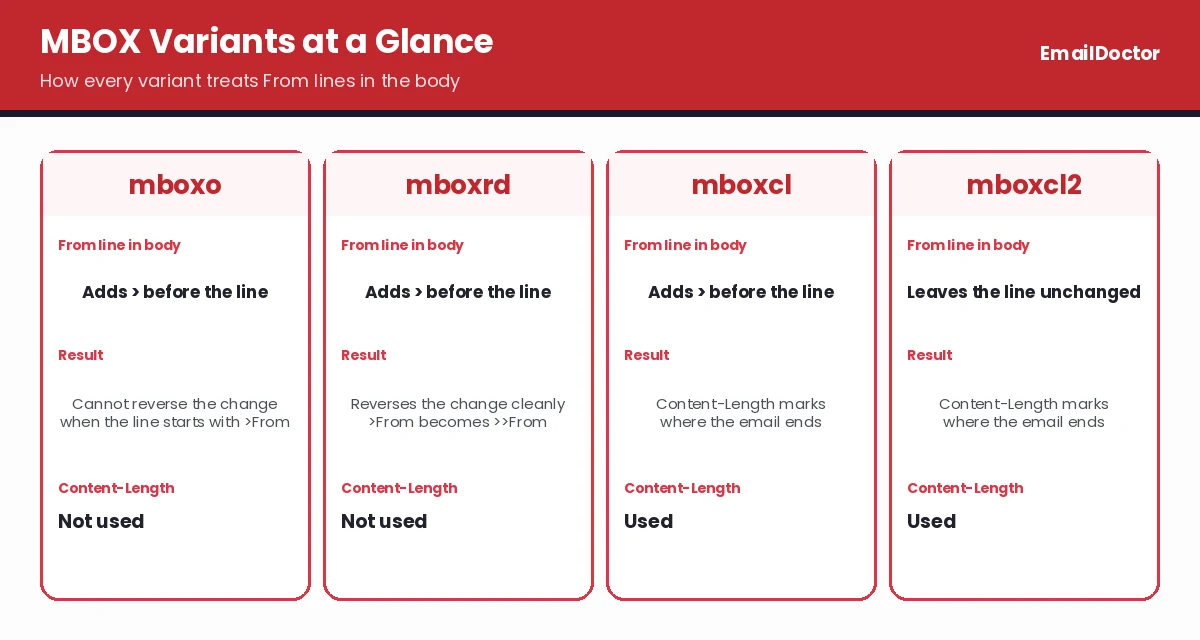
Content-Length headers let clients ignore body lines that start with From because they know where an email ends. Variants are not fully compatible. Library of Congress notes that mboxcl2 tools cannot reliably process mboxo or mboxrd files and that writing with a wrong tool can corrupt files.
Line counts that match From and a space give a wrong total in mboxcl2 files. Take a file with two emails where both bodies contain one line beginning with From. Counting those lines returns four and not two.
That explains why the same file looks different in two email clients. Thunderbird follows mboxrd style quoting while Eudora follows mboxo style quoting so lines beginning with >From can appear differently.
You can check your own file in a text editor but the result is a hint and not proof. Content-Length points to mboxcl or mboxcl2 only when its number matches the body size and >>From lines point to mboxrd. First From lines do not reveal the variant. Files with no From lines in any body can fit more than one variant.
How “From” Lines Look in Popular Email Platforms
Two lines that look alike do different work. Line one below has no colon and works as the MBOX separator, while line two is the author header inside the email.
From sender@example.com Mon Jan 05 09:30:00 2026
From: Sender Name <sender@example.com>
RFC 4155 describes the sender and timestamp form as the default but software varies. Separators can show an address, a dash or an export ID. That value need not match the From header.
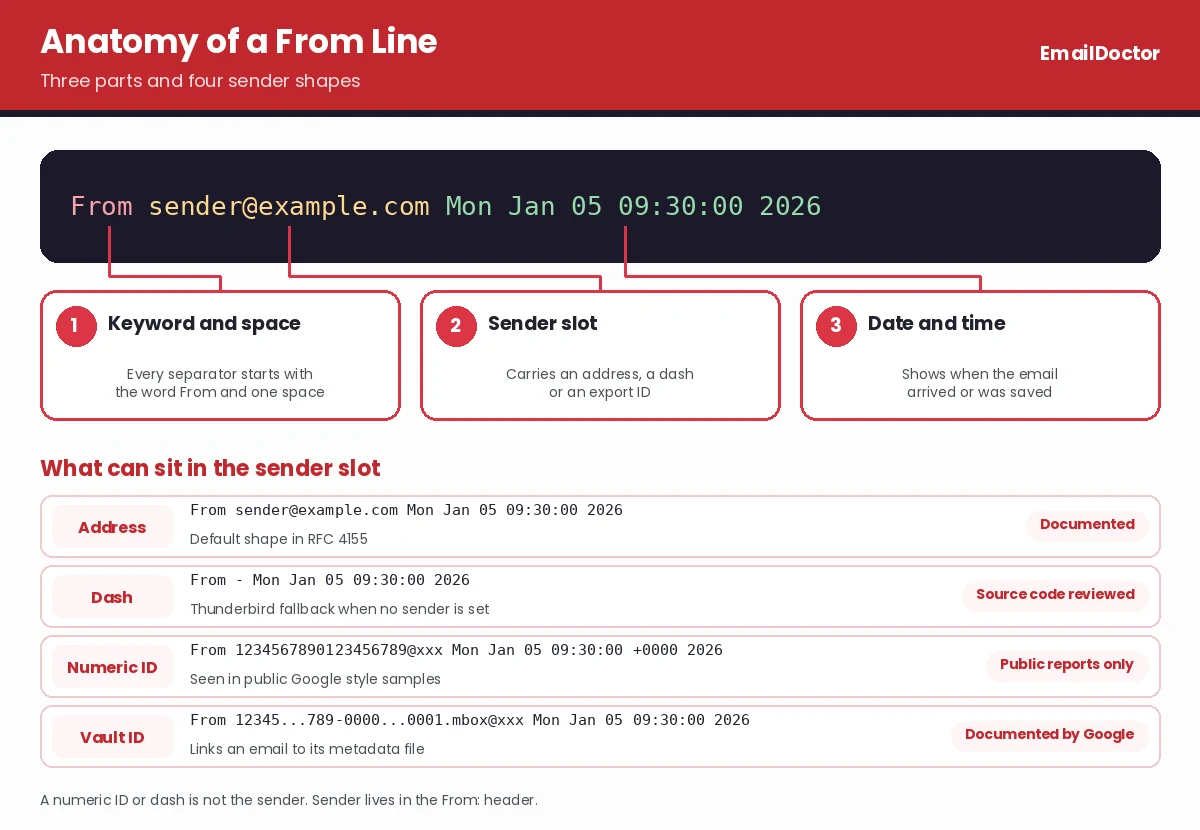
From sender@example.com Mon Jan 05 09:30:00 2026
From - Mon Jan 05 09:30:00 2026
From 1234567890123456789@xxx Mon Jan 05 09:30:00 +0000 2026
From 1234567890123456789-00000000-0000-4000-8000-000000000001.mbox@xxx Mon Jan 05 09:30:00 2026- Standard files use the sender and date shape shown above (first line).
- Thunderbird uses a dash when it has no envelope sender and its source code formats the date in GMT without a time zone.
- Google style files show a numeric ID after From and a time zone offset before the year in public sample reports. That pattern comes from user reports and not from a Google contract.
- Google Vault documents a longer ID that ends in .mbox@xxx and links the email to its metadata file. Do not treat that ID as the sender address.
All addresses, IDs and dates above are made up to show the shapes.
Our team reviewed vendor documents, open source code and public test reports in October 2026. Our team did not export mailboxes from every platform and the table shows what the sources state. "Not established" means the reviewed source does not name the separator or the variant.
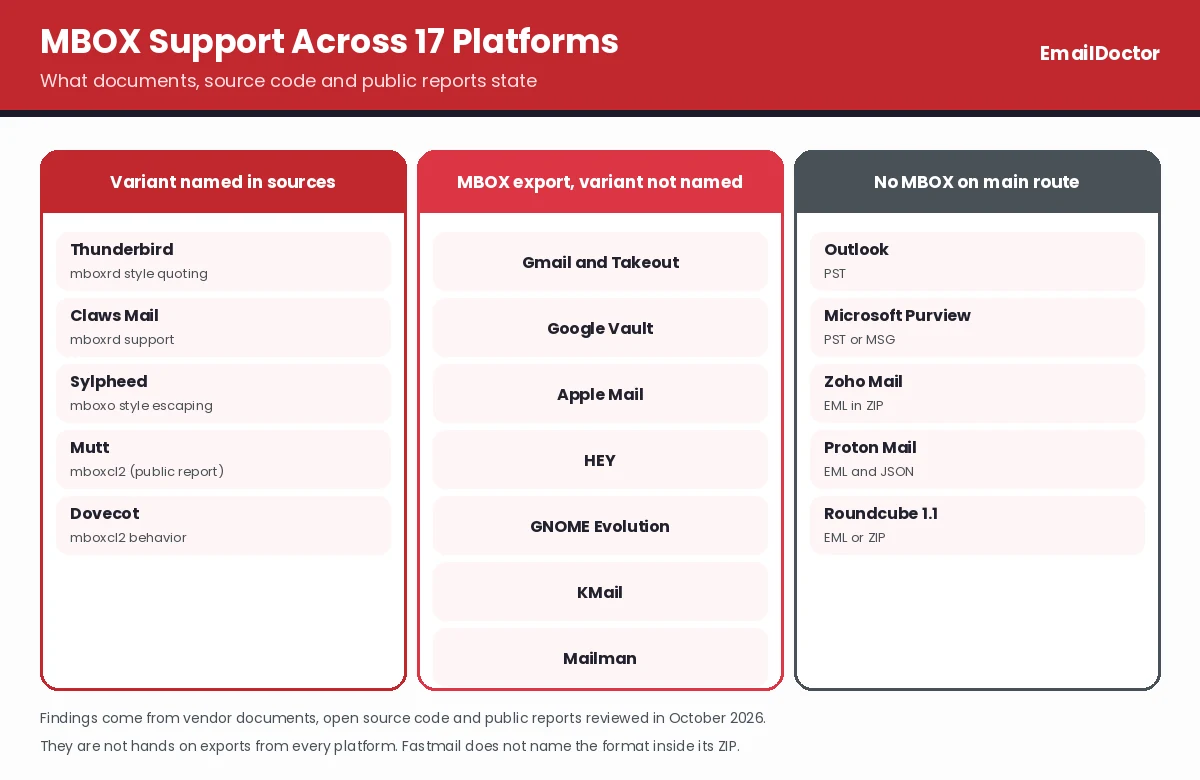
| Platform | Export Method | From Line Finding | Source |
|---|---|---|---|
| Gmail and Google Takeout | MBOX with labels in the X-Gmail-Labels header | Public samples show a numeric ID after From. Variant not established | Google Account Help |
| Google Vault | MBOX plus metadata file | Documented ID ending in .mbox@xxx. Variant not named | Google Vault Help |
| Thunderbird | MBOX message store | Sender and timestamp or a dash. Quotes From lines in mboxrd style | Thunderbird source code |
| Apple Mail | Mailbox export as .mbox package | Guide does not name the separator or variant | Apple Mail guide |
| HEY | MBOX with emails and attachments | Not established | HEY Help |
| GNOME Evolution | Save messages as MBOX | Export confirmed. Details not established | Evolution guide |
| KMail | Save As .mbox with headers and attachments | Details not established | KMail manual |
| Claws Mail | MBOX import and export | Manual names mboxrd support and the exporter builds a sender and date line | Claws Mail manual |
| Sylpheed | MH to MBOX export | Version 3.7.0 code builds an address or fallback plus date and escapes in mboxo style | Sylpheed source code |
| Mutt | MBOX mailbox saving | A 2025 test report describes mboxcl2 behavior with no From quoting | Mutt mailing list |
| Mailman and HyperKitty | Mailing list archive download as MBOX | Export supported. Details not established | Mailman list |
| Dovecot | MBOX storage on the server | Docs name mboxcl2 behavior with length based boundaries and no From quoting | Dovecot docs |
Several services do not use MBOX as their main export format.
- Outlook for Windows. Backs up to PST.
- Microsoft Purview. Exports PST or MSG.
- Zoho Mail. Exports EML files in a ZIP.
- Proton Mail. Exports EML with JSON.
- Roundcube 1.1. Downloads EML files and ZIP bundles.
- Fastmail. Does not name the format inside its ZIP download.
Your email service and the app that saves the final file can be different systems. Gmail emails saved by Thunderbird follow Thunderbird rules and not a Gmail format.
Compare two files by noting the export method, software version, file hash, first separator lines and the look of body lines beginning with From. Store the original export separately from any converted copy.
Which Email Clients Save Mail as MBOX?
Many email clients save or export mail as MBOX. Where the file sits depends on the client.
| Client | How It Uses MBOX |
|---|---|
| Thunderbird | Saves every folder as one file and adds an .msf index file |
| Apple Mail | Exports a mailbox as a folder that ends with .mbox and places a file named mbox inside it |
| Google Takeout | Exports Gmail data in MBOX format inside a ZIP download |
| Eudora | Follows an mboxo style format and stores attachments in a separate folder |
Postbox, SeaMonkey, Opera Mail, Entourage, PowerMail, Netscape, Evolution and Claws Mail also work with MBOX. Gmail cannot open an exported file directly.
Microsoft Outlook saves mail in PST files and does not open MBOX. You need a conversion step first and Import MBOX to Outlook explains the methods.
MBOX Compared With PST, EML and Maildir
MBOX stores many emails in a single file while EML and Maildir save one email per file. PST is a Microsoft format that stores emails, contacts and calendars in one binary database file.
| Format | Stores | Opens With | Plain Text |
|---|---|---|---|
| MBOX | Many emails in one file | Thunderbird, Apple Mail and other clients | Yes |
| EML | One email per file | Outlook, Thunderbird and Apple Mail | Yes |
| Maildir | One email per file inside folders | Mail servers and Unix clients | Yes |
| PST | Emails, contacts and calendars in one file | Microsoft Outlook | No |
- Choose MBOX. Use MBOX when you need one portable backup of a mailbox.
- Choose EML. Use EML when you need to share a single email.
- Choose PST. Use PST when Microsoft Outlook is your email client.
Common MBOX Problems and How to Fix Them
Most MBOX problems come from the From line, file size or damaged data. Quick fixes below match the common cases.
- One Email Splits Into Two. Body lines that start with From look like separators to clients. Test your file in a second client before you decide it is damaged.
- Slow Opening. Large files slow every client. Split MBOX File divides it into smaller parts and Compress MBOX File reduces its size.
- Thunderbird Shows Errors. Damaged folders cause missing emails and Repair Thunderbird Email Folders explains the fix.
- Corrupt Data. Two applications that save to one file at the same time can damage it. Close your email client before you copy files.
How to Convert MBOX to Other Formats? Convert MBOX when your destination app cannot open it. MBOX converter software converts MBOX to PDF in batches and stores attachments with their emails. Other options include the MBOX to PST Converter for Outlook, Convert MBOX to EML for single emails and MBOX import steps for Microsoft 365 for Microsoft 365 mailboxes.
Frequently Asked Questions
Common questions about the format are answered below.
What is MBOX File Used for?
MBOX backs up mailboxes, moves emails between clients and stores archives. Google Takeout also uses MBOX for Gmail exports.
Is MBOX File Safe to Open?
Yes. MBOX is plain text so opening one in an editor does not execute anything. Attachments inside can contain harmful files so scan them before you open them.
Can Outlook Open MBOX Files?
No. Outlook uses PST files so convert MBOX to PST first with the MBOX to PST Converter.
How to Open MBOX Files on Windows?
Import the file in Thunderbird with ImportExportTools NG or open it in MBOX viewer software. Text editors show only raw data.
What is the Difference Between MBOX Variants?
Variants differ in how they treat body lines beginning with From. Mboxrd reverses the quoting cleanly while mboxo cannot and mboxcl and mboxcl2 use a Content-Length header.
Can You Tell the MBOX Variant From the First From Line?
No. First lines show a sender and date or an ID and do not name the variant. Check body lines that open with From and any Content-Length header instead and confirm that its number matches the body size.
Does MBOX File Include Attachments?
Yes. MBOX stores attachments as encoded MIME parts inside every email. Eudora is the exception because it stores attachments in a separate folder.
Is There a Size Limit for MBOX Files?
No. MBOX has no fixed size limit but email clients and file systems set their own limits. Large files slow email clients and are easier to damage so split big files into smaller parts before you import them.
Can I Open MBOX File Without Email Client?
Yes. Use Notepad to see the plain text or viewer software to see the emails in a readable layout. Neither option needs an email client.
Where Does Thunderbird Store MBOX Files?
Go to the Help menu and select the troubleshooting information page. Click the open button next to your profile folder. Local accounts sit inside Mail and IMAP accounts sit inside ImapMail.
Final Words
People struggle to open MBOX emails because From lines and variant rules hide inside plain text. Back up your file before you edit anything.
Check the From lines in Notepad and then import the file into Thunderbird. When you need to view or convert many files at once, EmailDoctor viewer and converter software opens and converts MBOX files on Windows and Mac.
- One MBOX file stores many emails or an entire mailbox as plain text.
- Every email starts after a From line and is saved in its raw format.
- Variants like mboxo, mboxrd, mboxcl and mboxcl2 follow separate rules for From lines.
- You can open MBOX files in Thunderbird or Apple Mail or with viewer software.
Next Read: Free Gmail MBOX Viewer
Also Read: Extract Attachments From MBOX File | Search MBOX File Data